Friday, September 2, 2011

BBM FLAG LIST! SOE EDITION

Greetings

Ever wondered how the hell to get the symbols for different flags etc well wish no more here is a blog on how to to display your BBM flag of choice, simply type in the related short code below (e.g. “*two letter country short code*”) into any text field. Please note that some country flags might not be currently supported in BBM. So with that said,,, enjoy flagging up your bbms peoples :D :D

Mr Technics

Afghanistan *AF* Ghana *GH* Palau *PW*
Albania *AL* Georgia *GE* Panama *PA*
Algeria *DZ* Germany *DE* Papua New Guinea *PG*
Andorra *AD* Ghana *GH* Paraguay *PY*
Angola *AO* Gilbratar *GI* People’s Republic of China *CN*
Anguilla *AI* Great Britain *UK* Peru *PE*
Antigua and Barbuda *AG* Greece *GR* Phillipines *PH*
Argentina *AR* Greenland *GL* Poland *PL*
Armenia *AM* Grenada *GD* Portugal *PT*
Aruba *AW* Guatemala *GT* Puerto Rico *PR*
Australia *AU* Guinea *GN* Qatar *QA*
Austria *AT* Guinea Bissau *GW* Republic of Moldova *MD*
Azerbaijan *AZ* Guyana *GY* Reunion *RE*
Bahamas *BS* Haiti *HT* Romania *RO*
Bahrain *BH* Honduras *HN* Russian Federation *RU*
Bangladesh *BD* Hong Kong *HK* Rwanda *RW*
Barbados *BB* Hungary *HU* Saint Kitts and Nevis *KN*
Belarus *BY* Iceland *IS* Saint Lucia *LC*
Belgium *BE* India *IN* Saint Vincent and the Grenadines *VC*
Belize *BZ* Indonesia *ID* Samoa *WS*
Benin *BJ* Iraq *IQ* San Marino *SM*
Bermuda *BM* Ireland *IE* Sao Tome and Principe *ST*
Bhutan *BT* Islamic Republic of Iran *IR* Saudi Arabia *SA*
Bolivia *BO* Israel *IL* Senegal *SN*
Bosnia and Herzegovina *BA* Italy *IT* Serbia and Montenegro *CS*
Botswana *BW* Ivory Coast *CI* Seychelles *SC*
Brazil *BR* Jamaica *JM* Sierra Leone *SL*
British Virgin Islands *VG* Japan *JP* Singapore *SG*
Brunei Darussalam *BN* Jordan *JO* Slovakia *SK*
Bulgaria *BG* Kazakhstan *KZ* Slovenia *SI*
Burkina Faso *BF* Kenya *KE* Solomon Island *SB*
Burundi *BI* Kiribati *KI* Somalia *SO*
Cambodia *KH* Kuwait *KW* South Africa *ZA*
Cameroon *CM* Kyrgyzstan *KG* South Korea *KR*
Canada *CA* Lao People’s Democratic Republic *LA* Spain *ES*
Cape Verde *CV* Latvia *LV* Sri Lanka *LK*
Cayman Islands *KY* Lebanon *LB* St. Pierre and Miquelon *PM*
Central African Republic *CF* Lesotho *LS* Sudan *SD*
Chad *TD* Liberia *LR* Suriname *SR*
Chile *CL* Libya *LY* Swaziland *SZ*
Colombia *CO* Liechtenstein *LI* Sweden *SE*
Comoros *KM* Lithuania *LT* Switzerland *CH*
Congo *CG* Luxembourg *LU* Syrian Arab Republic *SY*
Cook Islands *CK* Macao *MO* Taiwan *TW*
Costa Rica *CR* Madagascar *MG* Tajikistan *TJ*
Croatia *HR* Malawi *MW* Thailand *TH*
Cuba *CU* Malaysia *MY* Timor-Leste *TL*
Cyprus *CY* Maldives *MV* Togo *TG*
Czech Republic *CZ* Mali *ML* Tonga *TO*
Democratic Republic of the Congo *CD* Malta *MT* Trinidad and Tobago *TT*
Denmark *DK* Mauritania *MR* Tunisia *TN*
Djibouti *DJ* Mauritius *MU* Turkey *TR*
Dominica *DM* Mexico *MX* Turkmenistan *TM*
Dominican Republic *DO* Monaco *MC* Turks and Caicos Islands *TC*
Ecuador *EC* Mongolia *MN* Uganda *UG*
Egypt *EG* Montserrat *MS* Ukraine *UA*
El Salvador *SV* Morocco *MA* United Arab Emirates *AE*
Equatorial Guinea *GQ* Mozambique *MZ* United Republic of Tanzania *TZ*
Estonia *EE* Myanmar *MM* United States of America *US*
Ethiopia *ET* Namibia *NA* Uruguay *UY*
Falkland Islands *FK* Netherlands *NL* Uzbekistan *UZ*
Faroe Islands *FO* Netherlands Antilles *AN* Vanuatu *VU*
Federated States of Micronesia *FM* New Caledonia *NC* Venezuala *VE*
Fiji *FJ* New Zealand *NZ* Vietnam *VN*
Finland *FI* Nicaragua *NI* Yemen *YE*
Former Yugoslav Republic of Macedonia *MK* Niger *NE* Zambia *ZM*
France *FR* Nigeria *NG* Zimbabwe *ZW*
French Antilles (temporary) *FR-AN* North Korea *KP*
French Polynesia *PF* Norway *NO*
Gabon *GA* Oman *OM*
Gambia *GM* Pakistan *PK*

Thursday, September 1, 2011

Blackberry Browser Speed Up Tip!!

Greetings

We all know that the current BlackBerry Browser leaves much to be desired. Until the release of the new Webkit browser we’re stuck with this lackluster one. One gripe that BlackBerry users have with respect to the browser is its speed. Fortunately with a few setting tweaks in browser options you’ll notice a significant increase in your browsing speed.

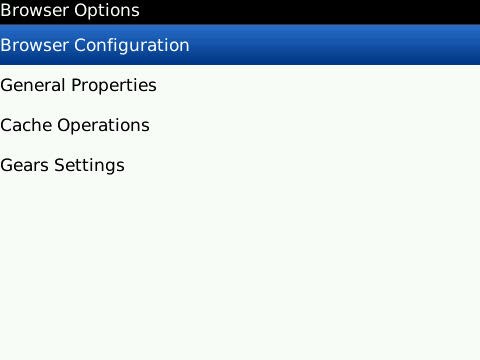
  1. Launch BlackBerry Browser and select Options from the BlackBerry menu.
  2. Select Browser Configuration from the Browser Options screen.
  3. Deselect Support JavaScript and Save Options from the BlackBerry menu and click Save Options on the BlackBerry menu.
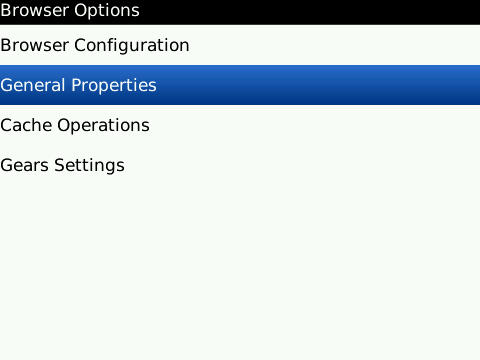
  4. On  the Browser Options page select General Properties.
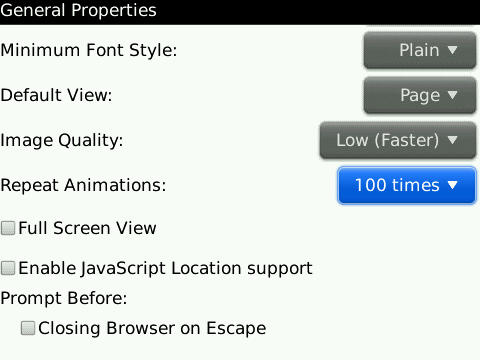
  5. On the General Properties page scroll down to Image Quality and change that option to Low (faster).
  6. Select Animations and change that value down to either 10 times or Once, then, click  Save Options from the BlackBerry Menu.
It may not seem like much, but these alterations will make a dramatic difference in your browsing experience even while browsing on EDGE (at least it did for me). Now, the caveats to making these changes are that images will be of poor quality. I’d rather take a shorter loading time than pretty pictures. Also, since we disabled JavaScript, certain pages won’t load properly. Usually there’ll be a popup messages asking if you’d like to reload with Java enabled (just for that page), if not, simply click the ‘J’ key and the page will refresh with Java enabled.

Wednesday, August 31, 2011

SOE BORDUM HELPER!!

Greetings
I know it has been a while but i have been on lock down with work with our islands ongoing state of emergency.. but all is well for I have faith. I wouldn't be online much but my blogs would be most active.. **yea i know i said that some time ago lol anyways.. here is some good material to ward off the SOE bordum :) enjoy

The Internet chore that just never seems to get easier.
As we spend more of our lives online, we use more of our brains creating and keeping track of Internet passwords.
We need them to access banks, e-mail accounts, social networks, shopping sites, travel sites, loan programs, mortgage statements... The list goes on and on. And, to be extra safe, we need to have a different password for each online account.
It's enough to give any Internet user a World Wide Web-sized headache.
ABC News asked security experts for their advice on creating and managing online passwords. Check out their tips below:

1. Be Complicated.
With all the passwords you have to remember, it can be tempting to keep it simple. But experts say short, basic passwords are a cakewalk for hackers.
"The passwords that are the weakest, that are the easiest for hackers or crackers, are short common words, simple, obvious phrases," said Jeff Fox, technology editor for Consumer Reports.
Cyber criminals often use software to help them figure out passwords, he said, and most programs can run through the most common words in the English language in just a minute or two.
Basic character arrangements, such as "123456" and "abc123," are also definite no-nos, he said.
Photo: Internet Security: Top 7 Tips for Creating and Managing Online Passwords: Expert Advice for Creating, Remembering and Storing Strong Internet Passwords
Getty Images
Tips for creating and remembering strong online passwords.
Even though it means more typing, he said to aim for eight characters or more. The added characters multiply by billions the number of possible passwords criminals have to check.
And the longer it takes hackers to break into your account, the less likely it is that they'll succeed.

Password Checkers Can Help Evaluate Strength

If you want to check the strength of your password, a few online serivces, such as Microsoft's Password Checker and Password Meter are good options.
If you're told that a password is weak, Fox says to strengthen it. He said he recently found that Facebook allows people to use passwords, such as "circus," "victim" and "social," even though it leaves them vulnerable.
2. Try Creative Spellings.
If you have to be complicated, you might as well have some fun with it.
Fox said a way to thwart potential code crackers it to use punctuation marks and other symbols in place of letters.
He suggested choosing words you won't forget, but substituting a "$" for an "S" or a "+" for a "T."
"Obviously, if you use a random set of characters, you can never remember it," he said. "A good thing to do is take a normal word or name and then alter it by putting numbers and punctuation symbols into it somewhere."
For example, if you want to use the word sunshine, use a "1" instead of an "I," he said.
Changes like that are small enough to remember, but significant enough to make life hard for a would-be hacker.


Passwords Can Include Favorite Quotes, Personal Names

3. Make it Personal.
If you're worried about forgetting your growing collection of passwords, experts say you should keep them personal.
"I would use a combination of some personal information backwards," said Avivah Litan, a security analyst for technology research firm Gartner.
Assuming you remember your mother's birthday, she suggested reversing it in the password. A child's name or pet's name are other options.
Litan also said you can use that personal name as the root for a number of online passwords. For example, if your son's name is Daniel, you could use "LIENAD5" for an Amazon account and "LIENAD6" for eBay.


4. Use an Acronym.
Have a favorite phrase or words to live by? Put it to work for you.
Fox said another way to build a password system you won't forget is to take a phrase and turn it into an acronym. You can add extra numbers or characters to the beginning or end to change it up for different online accounts.
Say you use "I pledge allegiance to the flag." "2IPATTF" could be your Google password, "3IPATTF" could be your banking password and so on.
"It allows you to make a lot of passwords and [it's] easy to remember and very hard to crack," he said. "How do you have multiple passwords but not have to remember them all? Well, I use acronyms with numbers but from one account to another, I just change the number."
As long as you remember the acronym, he said, you could even keep a slip of paper in safe place with the names of your accounts and numbers next to them. If someone picked up the piece of paper they wouldn't be able to use it against you because they don't know the key acronym.

5. Try a Password Manager.
If you think your memory needs some high-tech help, you could use one of several password management programs.
Password managers are programs that remember and then recall your passwords for a range of accounts across the Web and, sometimes, across different devices. Instead of remembering anywhere from five to 15 (or more) passwords, you only need to remember the one, super-strong password that protects them all.
RoboForm, which costs $29.95, stores user names, passwords and login URLs in encrypted files but then automatically recalls the necessary credential information as the user surfs the Web. It even works across different computers.
KeePass provides a similar service for free.


Online Security Can Often Start With Common Sense

6. Go Low-Tech.
Despite the high-tech options on the market, some computer security experts say that when it comes to password management, they like to take the low-tech road.
"There's the security issue of putting all of your eggs in one basket," said Fox. Even though a password manager can help protect and remember your many online passwords, if a hacker can figure out that one password, he can get his hands on all of them.
Fox also said that not all programs can supply your passwords across multiple devices. As a man with many machines, he said he probably wouldn't be able to rely on a piece of software.
"I don't think it's a bad idea. It's a matter of personal style," he said, adding that he saves his on a carefully-stored piece of paper.
Litan also said that she recommends a pen and paper over a computer program.
"I recommend you keep them in a paper file. Sophisticated criminals know how to break into your PC; the last thing you want to do is store them in your PC," she said.
If you can password-protect your cell phone or smart phone, she said you could also store your passwords in a note or file there.

7. Shhh! Keep them to Yourself.
It seems like a no-brainer, but experts say it still happens too frequently – after all the hard work they put into creating a strong password, users simply give it away.
"Don't leave your password on a post-it next to your computer or lying around anywhere or give it to anybody on the phone or by email," Fox said. "Many hackers are able to get in and get what they want not through technological means but through getting on the phone and impersonating an official-sounding person."
Be suspicious if an IT officer calls up and asks for a password over the phone or if your bank tells you to send it over e-mail. Most reputable institutions don't ask people for passwords by e-mail anymore, he said.

So be wise peoples lets make it harder for the peoples who are up to know good.. or you can be just oblivious and stupid :) yes harsh words but i have to say it as it is.

Mr Technics


Sunday, July 31, 2011

Idiot Drivers!!!!

Greetings!!!

I am back !! been a while but I have been under the clock of stress and work combined.. was going to go ablaze on the issues at hand but i wouldn't for now cause i would have enough material to have more blogs coming much sooner..Must say i am kind of stretching myself thin but not thin enough for i am still procrastinating on allot of stuff bahhh.. anyways i would keep this blog short and just insert a vid that I took for a experience I had heading to the airport a night.


Belive it or not this guy had his indicator going the wrong way from since TRINCITY.... now sometimes i guess people forget and what not.. but drivers like him does cause deaths on the road.. just saying!!

Sunday, June 26, 2011

Securing Your Internet Life

Greetings all,

We live in a world where information = power, in which if one has enough information he/she can influence/change or manipulate someone life to suit. However its not just about having the information its what some people do with it. Belive it or not, one of the biggest threats that people in the world today face are cyber stalking and cyber harassment which of course is found on social networks such as Linkedin, Myspace and the king of social networks.... dun dun dunn!!! Facebook. One thing i am sure, and i mean VERYYYYYYYYYYY sure that i can take all of the money that i don't have in my wallet and state... out of 10 users who join a social networking site or who are on doesn't examine the privacy policy of these such sites. It is an important part of being proactive about your personal information, because the policy document explains how the website parent company plans to share or not to share maybe,,, the information you provide them with. how do you think spam visits your mailboxes by a miracle ? no, sorry its the internet nothing happens without a reason or a source. Lets get a bit boring and explain the basics of this thing call spamming. Take note that this is the result of a company/companies selling your information or well your accounts get hacked.

Cancellable Usenet spam is a single message sent to 20 or more Usenet newsgroups. (Through long experience, Usenet users have found that any message posted to so many newsgroups is often not relevant to most or all of them.) Usenet spam is aimed at "lurkers", people who read newsgroups but rarely or never post and give their address away. Usenet spam robs users of the utility of the newsgroups by overwhelming them with a barrage of advertising or other irrelevant posts. Furthermore, Usenet spam subverts the ability of system administrators and owners to manage the topics they accept on their systems.

Email spam targets individual users with direct mail messages. Email spam lists are often created by scanning Usenet postings, stealing Internet mailing lists, or searching the Web for addresses. Email spams typically cost users money out-of-pocket to receive. Many people - anyone with measured phone service - read or receive their mail while the meter is running, so to speak. Spam costs them additional money. On top of that, it costs money for ISPs and online services to transmit spam, and these costs are transmitted directly to subscribers.


OOOOOOOOOOOOkKKK bleh boring stuff aside basically what all that mambo jumbo above was stating that at the end of the day, what we put on the internet is logged and recorded like a DVR and basically companies sell your information because information is power and well very valuable as well. Moving on to Passwords........ If it have one thing i am realllllllllllllllllllllllllllllYYYY anoyyyyyed with is when i go/visit my email accounts i see these weird messages from my friends,,,, i am sure you have seen the ,,, HI i just saved xyz on abcd or the HEY omg you just won a zillion dollars etc. Welllllll your account is compromised or is jacked up in layman terms. This process is basically hackers targeting peoples with simple passwords such as their birthdays, age, etc you know the drill. Doing such is a recipe for hack me or use my account as a spamming empire! Honestly probably in another blogg i would state my top ten measures to secure yourself from this but the number one rule which is the most important and most effective one is to ... SET A STRONG PASSWORD ON YOUR ACCOUNTS YAL LAZY BASTARDOS!.. yes my spanish is on point :). The effectiveness of security of increasing the length of a password by just one more letter, symbol or number grows in a very, VERRRRRRRRRRY, steep exponential rate.. (((in Trinidadian lingo.. it go protect ya rass))). The logic is a simple one... For every extra digit you add on to your password you triple, quadruple which basically sets a iron panty on your account from the internet rapists! The longer the password the more effort required to discover it. buuuuuuuuttt the problem with that thou is that longer passwords also means more difficult for us the users to remember it.. trust me I know lol. 

Let me show a little table below to show how long it takes for a hacker to discover your password:

No. of Characters
Possible Combinations
Human Hacker
Computer Hacker
1363 minutes0.000018 seconds
21, 3002 hours0.00065 seconds
347, 0003 days0.02 seconds
41, 700, 0003 months1 second
560, 000, 00010 years30 seconds
103, 700, 000, 000, 000, 000580 million years59 years

Hope you people taken this blog serious because if you don't its the lazy persons that get hacked the easiest!.  To conclude because i don't want the blog over long, setting a password that is complex yet easy to remember takes some thinking but it would save you, embarrassment, fraud, your sanity and provide peace of mind when you set a password that is suited for the filthy internet that we peruse daily bleh.. and just to show that i am not spiting rubbish, for this blog for me to access it i have a 14 character password and for all my social sites/email address i have different passwords. I am extreme about it thou so no need to follow my example but yet again

Victory loves preparation :) thanks for reading and keep tuned !!

Monday, June 20, 2011

Uncle Jack aka Don Jack

Greetings all


Today is a interesting day, today today to to to today... <<< yup that stutering means only one thing... uncle jack.. Would you even think that the man who claimed that he not moving a place <<his words not mines<< has now retired ??? brrrrrrrrrrrrrrrrrrrrrrrrrrrrrrrrr?? and on his retirement he has been cleared from all charges.. biger BRRRRRRRRRRRRRRRRRRRRR???????????? Yet again a Trinidadian shows the world that **in meh trini dialect* we bright no A..* LOL.. I swear hon Jack Warner played his cards just how he wanted to do it. Did you really think that he was going to get "lock up" nope never. People fail to realize FIFA handle its affairs on its own, and its a lobbing type system.. fancy word for domesticated mafia system i must say.

On his way: Jack Warner has left his long-term post with FIFA

Honestly Uncle Jack is a Don and I shalt be now referring him as Don Jack if you don't like it ask yuh muda!<< Google ask yuh muda by jack warner for more details<< But on a serious note i personally think that what Don Jack does outside of our country is a foreign matter and we shouldn't be to interested by it because things isn't always what it seems to be. From the Chuck Blazer who points fingers to the Mohammed Bin Hammam who points fingers to everyone then retires to the Sepp Blatter who is like I doh know what going on ask them, to Don Jack who is like ask yuh mudda then all of a sudden Hammam is no where to be found, Chuck Blazer is mumbling words , Sepp Blatter has no opposition for FIFA presidency and now Don Jack Retires. Yup.. sounds like a script to me but not even I Mr Technics is willing to comment further on this foreign affair.

You must remember Don Jack has been with the organisation 30 years so i believe and now he is involved with politics with our country in which i need to share something with you all. Remember when the Unc/Cop/abcdefg alliance came into power it had a issue with Don Jack holding two portfolios? It is written in words of the land that this cannot be but he got * clearance or w.e it was* so that he can perform at both capacities. At the end of the day Don Jack know what he was doing and he know what he needed to be done regarding that and my view on it is like this.

The story of how Don Jack Retired the Trinidadian dialect story.

Don Jack: Eh Hammam you wana go up for FIFA presidency or wut lewee get rid of Sepp
M. Hammam: Hmm REALLY yea yea no scn
Don Jack: niceness hold a lil pocket change they.
M. Hammam: Thanks Jack your the best :D
Don Jack: No scn man laters

Don Jack: picks up phone and makes a call...EH blatter its done
Sepp Blatter: Nice
Don Jack: yea man one more favor then i feel i good with this FIFA thing yes
Sepp Blatter: Well scn things in a gear then fix me and i fix you
Don Jack: word!

M. Hammam: JACK waz that one hoss!!!
Don Jack: ? ask yuh mudda!
M. Hammam: alu real stink jed!!
Don Jack: ? ask yuh mudda!
M. Hammam: **cries** i go fix yuh jack
Don Jack: ? after yuh ask yuh mudda ?

Chuck Blazer: eh M. Hammam doh study it I GO SELL them OUT
M. Hammam: yea yea no scn man
Chuck Blazer: Everyone Don Jack bribe me and he and she and thee and that and it !!!
Don Jack: Where I from informers does disapear eh but go ahead like urself.
Chuck Blazer: I doh care
Don Jack: Word
Sepp Blatter: amm Chuck yuh know i am the President now right?
Chuck Blazer: :O hi Sepp
Sepp Blatter: I good. so what you was saying now ?
Chuck Blazer: ? me what i say ?
Sepp Blatter: scn scn
Don Jack: anwys things hot now so laters fellas i out

Whole of FIFA.. BRRRRRRRRRRRRRR ???????

End :D

Now this is just my thinking of how the story happened eh and its all alleged so don't take it serious :) thanks for reading.

Monday, May 30, 2011

The Roast of Facebook LMAO

Greetings all

Wow is all i can say about this cartoon anime that College Humor did to show if social websites had a roast on Facebook. ITS extremely funny but it also comes with somewhat of well.. the truth. They speak about Facebook being a hoarder of privacy information which you usually have to take off and other stuff. However my highlight about this video is how they would jump on Myspace at every opportunity. LOL.. enjoy the cartoon peoples