Saturday, April 21, 2012

Trinidad & Tobago PARLIAMENT WEBSITE HACKED!

Greetings

It has been a while but hot off the press guess who has been striked and hard I must say but Guess who has been hacked !!!!!!!!! watch pic below


YUP thats right ttparliament.org has been hacked and my word somebody has allot of questions to answer so I hope people share this so that they can be like :OOOOOOOOOOOOOOOOOO.... but on the flip side I have stressed time and time again that we in Trinidad and Tobago are to relaxed when it comes to our Security ((IT wise)) anyone who knows me personally knows that I am very paranoid. but oh well.. At Trinidad and Tobago we don't get hurricanes etc so yea... but umm I will say this last thing

NEVER

MIX

POLITICS

WITH

IT

:)

Message brought to you by

MR Technics

Update The site is back up now hmmm 2days down huh how nice oh boi.

Updated blogg on this incident http://oirame999.blogspot.com/2012/04/tt-parliment-website-hacked-update.html

Thursday, November 3, 2011

Facebook Users BEWARE


Facebook users beware

Greetings

Today we will cover how nefarious cyber actors are using Facebook mail to target and entice users tospyware-and-malware-1.png click on a link. I’m sure a lot of you are well aware of phishing scams that are either sent to your personal or corporate email accounts.  The security industry has and continues to educate on the importance of not clicking on those types of emails.  Now with the rampant adoption of social networking such as Facebook, you now have the ability to receive Facebook mail. One could argue that it’s not traditional email but that does not matter as this has been an effective way to distribute malware and phishing attacks. Facebook statistics indicate that they have over 800 million users and to a bad cyber actor they can count on a percentage of users that will click on some form of malware. 
According to an article with research provided by BitDefender, almost 97% of Facebook and Twitter users “will blindly click on a link without checking for the presence of malware”. As a security expert, that number isn’t surprising as we sometimes might get a false sense of security with having end-point and network security devices in the corporate network.  However, sometimes that’s not enough, meaning education and awareness is paramount in reducing your risk profile. The following is a real use case of Koobface that was classified as a computer worm but also categorized as a Botnet. Since Social Networking is being allowed in a lot of corporate environments, it’s important that you educate your workforce on examples I’m about to show you.


Be vigilant

I can’t stress enough on the importance of being proactive and not clicking on embedded links in Facebook and other online social networking sites. Not only does this increase the risk of compromise to critical assets within the corporate infrastructure but also personal identifiable information on your home computer. 

Stay tuned 

Tuesday, October 18, 2011

Greetings

ITs amazing how. Google.com has become the search engine of choice for millions of internet users, quite frankly sometimes i think its skynet from the terminator series but thats just my own opinion lol ((serious about that thought thou))). 

But Anyhows...

There are some that advertise that they are “better than Google” search engine some day, but for now Google seems to be the best. Giving jack its jacket googles serch algorithym is the best. Part of the reason they are the best is that they keep developing new ways of looking at the internet. This tip however is not to boast or promote google but to list a couple additional features that Google offer us in which i recommend checking out because their always developing and improving their solutions. 

http://news.google.com/ Need a current event? Forget about the newspaper, use the internet like teenagers do to find stories that are only minutes old.

http://images.google.com/ Arguably the best image search engine in the world. Try finding a picture of something today.

http://www.google.com/products Looking to make a purchase. Shop and compare prices online first using Google's Product Search.

http://www.google.com/finance What to check the stock market, try this website for a quick overview.

http://maps.google.com/ Looking for an up to date map or satellite photo, check out these amazingly easy to manipulate maps and photos.

http://video.google.com/ Google has their own video search engine. Find an educational video on the internet that you can play for your class

http://scholar.google.com/ Another project that Google is working on is to create a more efficient way to search scholarly papers.

http://books.google.com/ This is a great way to jump into some literature. Check out a book online, read some passages and find out where you can buy a copy.

Brought to you by Mr Technics.

Wednesday, October 12, 2011

OFFICIAL MESSAGE FROM RIM aka BLACKBERRY

Greetings

OK this message was posted by BLACKBERRY 1hour ago or less.. when you read this please note that we are in the latin americas so now officially we can be on the GREEN and RED network arses cause they stickin cause the service is back up

To All BlackBerry Customers:
I want to first apologize for the service interruptions and delays many of you have been experiencing this week. I also wanted to connect with you directly, give you an update on the service issues we are trying to solve, and answer some of the questions and concerns you’ve expressed.

You’ve depended on us for reliable, real-time communications, and right now we’re letting you down. We are taking this very seriously and have people around the world working around the clock to address this situation. We believe we understand why this happened and we are working to restore normal service levels in all markets as quickly as we can.

Here is the current status of service and issues for the various regions that were impacted:

For Europe, Middle East, India and Africa (EMEIA):

  • Email systems are operating and we are continuing to clear any backlogged messages. Support teams are working to minimize the impact on our customers.
  • BBM traffic is online and traffic is passing successfully
  • Browsing is temporarily unavailable as the Support teams monitor service stability and continue to assess when this service can be safely brought online
  • Support teams have added capacity to help with message delivery between regions and continents


For Canada and Latin America:

  • Email systems are operating and we are continuing to clear any backlogged messages. Support teams are working to minimize the impact on our customers
  • BBM and browsing services are online and traffic is passing successfully (except for three carrier networks in Latin America that are serviced by the EMEIA infrastructure – browsing is temporarily unavailable for those three carrier networks)
  • Support teams are investigating reports of BBM delays


For the U.S.:


  • Email systems are operating and we are continuing to clear any backlogged messages. Support teams are working to minimize the impact on our customers.
  • Support teams have added capacity to help with message delivery between regions and continents
  • BBM and browsing services are online and traffic is passing successfully
  • Support teams are investigating reports of BBM delays

We will provide regular updates on BlackBerry.com, RIM.com and via our social channels. We are doing everything in our power to restore regular service everywhere and to restore your trust in us.

Yours sincerely,

Robin Bienfait

Friday, September 2, 2011

BBM FLAG LIST! SOE EDITION

Greetings

Ever wondered how the hell to get the symbols for different flags etc well wish no more here is a blog on how to to display your BBM flag of choice, simply type in the related short code below (e.g. “*two letter country short code*”) into any text field. Please note that some country flags might not be currently supported in BBM. So with that said,,, enjoy flagging up your bbms peoples :D :D

Mr Technics

Afghanistan *AF* Ghana *GH* Palau *PW*
Albania *AL* Georgia *GE* Panama *PA*
Algeria *DZ* Germany *DE* Papua New Guinea *PG*
Andorra *AD* Ghana *GH* Paraguay *PY*
Angola *AO* Gilbratar *GI* People’s Republic of China *CN*
Anguilla *AI* Great Britain *UK* Peru *PE*
Antigua and Barbuda *AG* Greece *GR* Phillipines *PH*
Argentina *AR* Greenland *GL* Poland *PL*
Armenia *AM* Grenada *GD* Portugal *PT*
Aruba *AW* Guatemala *GT* Puerto Rico *PR*
Australia *AU* Guinea *GN* Qatar *QA*
Austria *AT* Guinea Bissau *GW* Republic of Moldova *MD*
Azerbaijan *AZ* Guyana *GY* Reunion *RE*
Bahamas *BS* Haiti *HT* Romania *RO*
Bahrain *BH* Honduras *HN* Russian Federation *RU*
Bangladesh *BD* Hong Kong *HK* Rwanda *RW*
Barbados *BB* Hungary *HU* Saint Kitts and Nevis *KN*
Belarus *BY* Iceland *IS* Saint Lucia *LC*
Belgium *BE* India *IN* Saint Vincent and the Grenadines *VC*
Belize *BZ* Indonesia *ID* Samoa *WS*
Benin *BJ* Iraq *IQ* San Marino *SM*
Bermuda *BM* Ireland *IE* Sao Tome and Principe *ST*
Bhutan *BT* Islamic Republic of Iran *IR* Saudi Arabia *SA*
Bolivia *BO* Israel *IL* Senegal *SN*
Bosnia and Herzegovina *BA* Italy *IT* Serbia and Montenegro *CS*
Botswana *BW* Ivory Coast *CI* Seychelles *SC*
Brazil *BR* Jamaica *JM* Sierra Leone *SL*
British Virgin Islands *VG* Japan *JP* Singapore *SG*
Brunei Darussalam *BN* Jordan *JO* Slovakia *SK*
Bulgaria *BG* Kazakhstan *KZ* Slovenia *SI*
Burkina Faso *BF* Kenya *KE* Solomon Island *SB*
Burundi *BI* Kiribati *KI* Somalia *SO*
Cambodia *KH* Kuwait *KW* South Africa *ZA*
Cameroon *CM* Kyrgyzstan *KG* South Korea *KR*
Canada *CA* Lao People’s Democratic Republic *LA* Spain *ES*
Cape Verde *CV* Latvia *LV* Sri Lanka *LK*
Cayman Islands *KY* Lebanon *LB* St. Pierre and Miquelon *PM*
Central African Republic *CF* Lesotho *LS* Sudan *SD*
Chad *TD* Liberia *LR* Suriname *SR*
Chile *CL* Libya *LY* Swaziland *SZ*
Colombia *CO* Liechtenstein *LI* Sweden *SE*
Comoros *KM* Lithuania *LT* Switzerland *CH*
Congo *CG* Luxembourg *LU* Syrian Arab Republic *SY*
Cook Islands *CK* Macao *MO* Taiwan *TW*
Costa Rica *CR* Madagascar *MG* Tajikistan *TJ*
Croatia *HR* Malawi *MW* Thailand *TH*
Cuba *CU* Malaysia *MY* Timor-Leste *TL*
Cyprus *CY* Maldives *MV* Togo *TG*
Czech Republic *CZ* Mali *ML* Tonga *TO*
Democratic Republic of the Congo *CD* Malta *MT* Trinidad and Tobago *TT*
Denmark *DK* Mauritania *MR* Tunisia *TN*
Djibouti *DJ* Mauritius *MU* Turkey *TR*
Dominica *DM* Mexico *MX* Turkmenistan *TM*
Dominican Republic *DO* Monaco *MC* Turks and Caicos Islands *TC*
Ecuador *EC* Mongolia *MN* Uganda *UG*
Egypt *EG* Montserrat *MS* Ukraine *UA*
El Salvador *SV* Morocco *MA* United Arab Emirates *AE*
Equatorial Guinea *GQ* Mozambique *MZ* United Republic of Tanzania *TZ*
Estonia *EE* Myanmar *MM* United States of America *US*
Ethiopia *ET* Namibia *NA* Uruguay *UY*
Falkland Islands *FK* Netherlands *NL* Uzbekistan *UZ*
Faroe Islands *FO* Netherlands Antilles *AN* Vanuatu *VU*
Federated States of Micronesia *FM* New Caledonia *NC* Venezuala *VE*
Fiji *FJ* New Zealand *NZ* Vietnam *VN*
Finland *FI* Nicaragua *NI* Yemen *YE*
Former Yugoslav Republic of Macedonia *MK* Niger *NE* Zambia *ZM*
France *FR* Nigeria *NG* Zimbabwe *ZW*
French Antilles (temporary) *FR-AN* North Korea *KP*
French Polynesia *PF* Norway *NO*
Gabon *GA* Oman *OM*
Gambia *GM* Pakistan *PK*

Thursday, September 1, 2011

Blackberry Browser Speed Up Tip!!

Greetings

We all know that the current BlackBerry Browser leaves much to be desired. Until the release of the new Webkit browser we’re stuck with this lackluster one. One gripe that BlackBerry users have with respect to the browser is its speed. Fortunately with a few setting tweaks in browser options you’ll notice a significant increase in your browsing speed.

  1. Launch BlackBerry Browser and select Options from the BlackBerry menu.
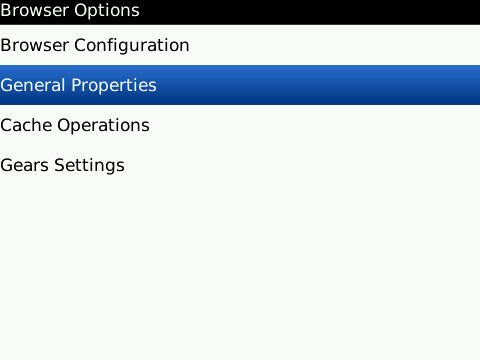
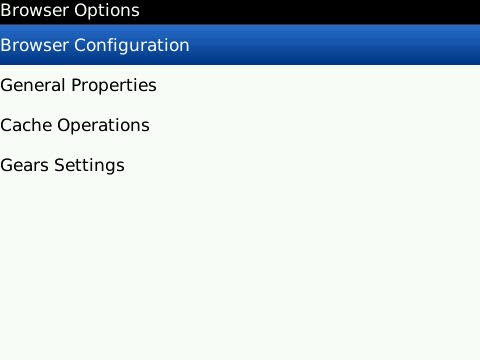
  2. Select Browser Configuration from the Browser Options screen.
  3. Deselect Support JavaScript and Save Options from the BlackBerry menu and click Save Options on the BlackBerry menu.
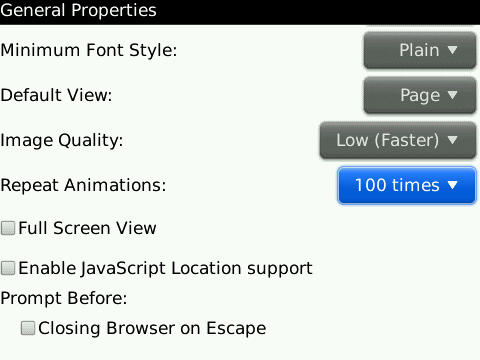
  4. On  the Browser Options page select General Properties.
  5. On the General Properties page scroll down to Image Quality and change that option to Low (faster).
  6. Select Animations and change that value down to either 10 times or Once, then, click  Save Options from the BlackBerry Menu.
It may not seem like much, but these alterations will make a dramatic difference in your browsing experience even while browsing on EDGE (at least it did for me). Now, the caveats to making these changes are that images will be of poor quality. I’d rather take a shorter loading time than pretty pictures. Also, since we disabled JavaScript, certain pages won’t load properly. Usually there’ll be a popup messages asking if you’d like to reload with Java enabled (just for that page), if not, simply click the ‘J’ key and the page will refresh with Java enabled.

Wednesday, August 31, 2011

SOE BORDUM HELPER!!

Greetings
I know it has been a while but i have been on lock down with work with our islands ongoing state of emergency.. but all is well for I have faith. I wouldn't be online much but my blogs would be most active.. **yea i know i said that some time ago lol anyways.. here is some good material to ward off the SOE bordum :) enjoy

The Internet chore that just never seems to get easier.
As we spend more of our lives online, we use more of our brains creating and keeping track of Internet passwords.
We need them to access banks, e-mail accounts, social networks, shopping sites, travel sites, loan programs, mortgage statements... The list goes on and on. And, to be extra safe, we need to have a different password for each online account.
It's enough to give any Internet user a World Wide Web-sized headache.
ABC News asked security experts for their advice on creating and managing online passwords. Check out their tips below:

1. Be Complicated.
With all the passwords you have to remember, it can be tempting to keep it simple. But experts say short, basic passwords are a cakewalk for hackers.
"The passwords that are the weakest, that are the easiest for hackers or crackers, are short common words, simple, obvious phrases," said Jeff Fox, technology editor for Consumer Reports.
Cyber criminals often use software to help them figure out passwords, he said, and most programs can run through the most common words in the English language in just a minute or two.
Basic character arrangements, such as "123456" and "abc123," are also definite no-nos, he said.
Photo: Internet Security: Top 7 Tips for Creating and Managing Online Passwords: Expert Advice for Creating, Remembering and Storing Strong Internet Passwords
Getty Images
Tips for creating and remembering strong online passwords.
Even though it means more typing, he said to aim for eight characters or more. The added characters multiply by billions the number of possible passwords criminals have to check.
And the longer it takes hackers to break into your account, the less likely it is that they'll succeed.

Password Checkers Can Help Evaluate Strength

If you want to check the strength of your password, a few online serivces, such as Microsoft's Password Checker and Password Meter are good options.
If you're told that a password is weak, Fox says to strengthen it. He said he recently found that Facebook allows people to use passwords, such as "circus," "victim" and "social," even though it leaves them vulnerable.
2. Try Creative Spellings.
If you have to be complicated, you might as well have some fun with it.
Fox said a way to thwart potential code crackers it to use punctuation marks and other symbols in place of letters.
He suggested choosing words you won't forget, but substituting a "$" for an "S" or a "+" for a "T."
"Obviously, if you use a random set of characters, you can never remember it," he said. "A good thing to do is take a normal word or name and then alter it by putting numbers and punctuation symbols into it somewhere."
For example, if you want to use the word sunshine, use a "1" instead of an "I," he said.
Changes like that are small enough to remember, but significant enough to make life hard for a would-be hacker.


Passwords Can Include Favorite Quotes, Personal Names

3. Make it Personal.
If you're worried about forgetting your growing collection of passwords, experts say you should keep them personal.
"I would use a combination of some personal information backwards," said Avivah Litan, a security analyst for technology research firm Gartner.
Assuming you remember your mother's birthday, she suggested reversing it in the password. A child's name or pet's name are other options.
Litan also said you can use that personal name as the root for a number of online passwords. For example, if your son's name is Daniel, you could use "LIENAD5" for an Amazon account and "LIENAD6" for eBay.


4. Use an Acronym.
Have a favorite phrase or words to live by? Put it to work for you.
Fox said another way to build a password system you won't forget is to take a phrase and turn it into an acronym. You can add extra numbers or characters to the beginning or end to change it up for different online accounts.
Say you use "I pledge allegiance to the flag." "2IPATTF" could be your Google password, "3IPATTF" could be your banking password and so on.
"It allows you to make a lot of passwords and [it's] easy to remember and very hard to crack," he said. "How do you have multiple passwords but not have to remember them all? Well, I use acronyms with numbers but from one account to another, I just change the number."
As long as you remember the acronym, he said, you could even keep a slip of paper in safe place with the names of your accounts and numbers next to them. If someone picked up the piece of paper they wouldn't be able to use it against you because they don't know the key acronym.

5. Try a Password Manager.
If you think your memory needs some high-tech help, you could use one of several password management programs.
Password managers are programs that remember and then recall your passwords for a range of accounts across the Web and, sometimes, across different devices. Instead of remembering anywhere from five to 15 (or more) passwords, you only need to remember the one, super-strong password that protects them all.
RoboForm, which costs $29.95, stores user names, passwords and login URLs in encrypted files but then automatically recalls the necessary credential information as the user surfs the Web. It even works across different computers.
KeePass provides a similar service for free.


Online Security Can Often Start With Common Sense

6. Go Low-Tech.
Despite the high-tech options on the market, some computer security experts say that when it comes to password management, they like to take the low-tech road.
"There's the security issue of putting all of your eggs in one basket," said Fox. Even though a password manager can help protect and remember your many online passwords, if a hacker can figure out that one password, he can get his hands on all of them.
Fox also said that not all programs can supply your passwords across multiple devices. As a man with many machines, he said he probably wouldn't be able to rely on a piece of software.
"I don't think it's a bad idea. It's a matter of personal style," he said, adding that he saves his on a carefully-stored piece of paper.
Litan also said that she recommends a pen and paper over a computer program.
"I recommend you keep them in a paper file. Sophisticated criminals know how to break into your PC; the last thing you want to do is store them in your PC," she said.
If you can password-protect your cell phone or smart phone, she said you could also store your passwords in a note or file there.

7. Shhh! Keep them to Yourself.
It seems like a no-brainer, but experts say it still happens too frequently – after all the hard work they put into creating a strong password, users simply give it away.
"Don't leave your password on a post-it next to your computer or lying around anywhere or give it to anybody on the phone or by email," Fox said. "Many hackers are able to get in and get what they want not through technological means but through getting on the phone and impersonating an official-sounding person."
Be suspicious if an IT officer calls up and asks for a password over the phone or if your bank tells you to send it over e-mail. Most reputable institutions don't ask people for passwords by e-mail anymore, he said.

So be wise peoples lets make it harder for the peoples who are up to know good.. or you can be just oblivious and stupid :) yes harsh words but i have to say it as it is.

Mr Technics